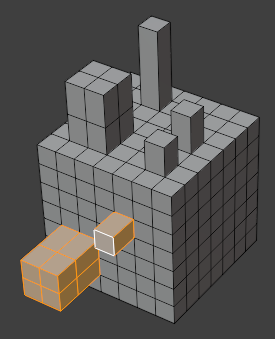
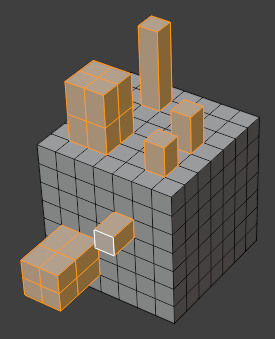
Select Similar
Reference
- Mode:
Edit Mode
- Menu:
- Shortcut:
Shift-G
Selects all mesh elements that are similar in a certain way to one that’s already selected. The list of comparable properties depends on the current selection mode:
- Vertex Selection Mode:
- Normal
Compare the direction of the normal vector.
- Amount of Adjacent Faces
Compare the number of neighboring faces.
- Vertex Groups
Check whether the vertex is a member of any of the same vertex groups. The weight values are ignored.
- Amount of Connecting Edges
Compare the number of neighboring edges.
- Vertex Crease
Compare the Crease value.
- Edge Selection Mode:
- Length
Compare the edge length.
- Direction
Compare the direction vector of the edge.
- Amount of Faces Around an Edge
Compare the number of neighboring faces.
- Face Angles
Compare the angle between the two neighboring faces.
- Crease
Compare the Crease value.
- Bevel
Compare the Bevel Weight.
- Seam
Compare the UV Seam mark.
- Sharpness
Compare the Sharp mark.
- Freestyle Edge Marks
Compare the Freestyle mark.
- Face Selection Mode:
- Material
Compare the face material.
- Area
Compare the area.
- Polygon Sides
Compare the number of edges.
- Perimeter
Compare the sum of the edge lengths.
- Normal
Compare the direction of the normal vector.
- Coplanar
Similar to Normal, but only grows the existing selection at its borders instead of adding faces from anywhere on the mesh. This is essentially the same as Select Linked Flat Faces.
- Flat/Smooth
Compare the face shading mode.
- Freestyle Face Marks
Compare the Freestyle mark.
After selecting a property from the menu, further options are available in the Adjust Last Operation panel:
- Compare
How to compare numerical properties:
- Equal:
Select items with the same value.
- Greater:
Select items with a larger or equal value.
- Less:
Select items with a smaller or equal value.
- Threshold
Tolerance for numerical properties that almost match the searched value.
Face Regions
Reference
- Mode:
Edit Mode
- Menu:
For each region of connected faces in the selection, finds and selects other regions that have the same topology.